Tye Robinson
Product Design & UX Strategy

Verizon Self-to-Pro
Installer App

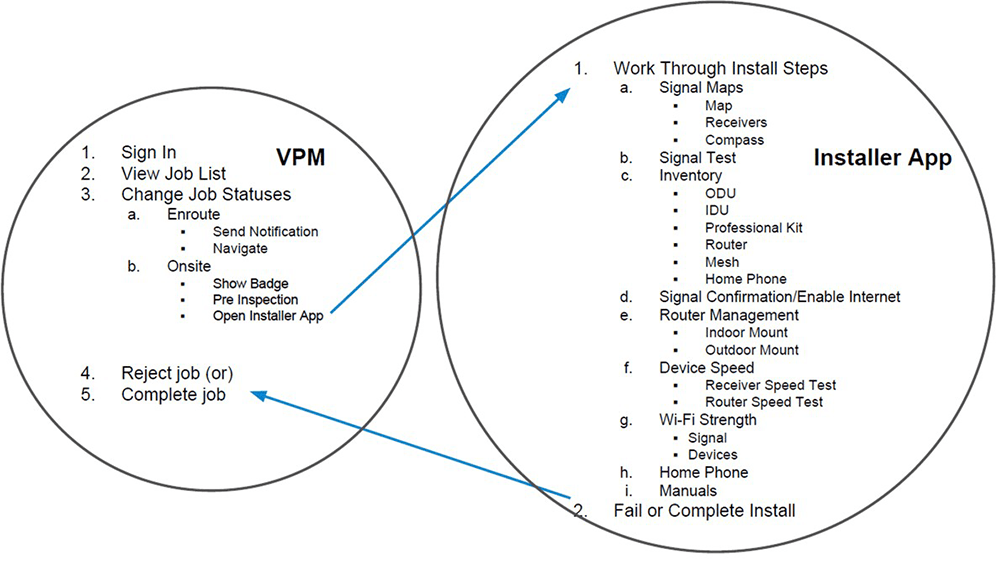
The Self-to-Pro Installer app connects three perspectives into one installation workflow: the customer, the service department, and the field installer. By designing shared handoffs and guided on-site steps, the experience reduces confusion, improves visibility, and supports first-time install success.

Self-to-Pro Installer hero
Role UX Lead
Team Design, Research, Engineering
Tools Sketch, InVision, Miro
Focus Mobile workflow + service blueprint

Overview

Project Overview

Verizon Self-to-Pro is a shared installation journey that spans customer readiness, support visibility, and installer execution. The app helps connect the moments that make or break an appointment: setting expectations, tracking status, and completing guided steps on site.

Role

  • Led workflow mapping and experience strategy across roles.
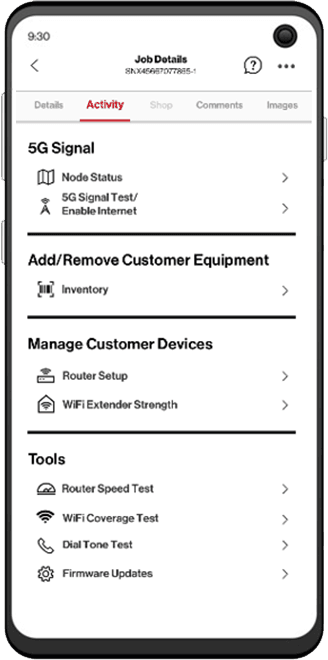
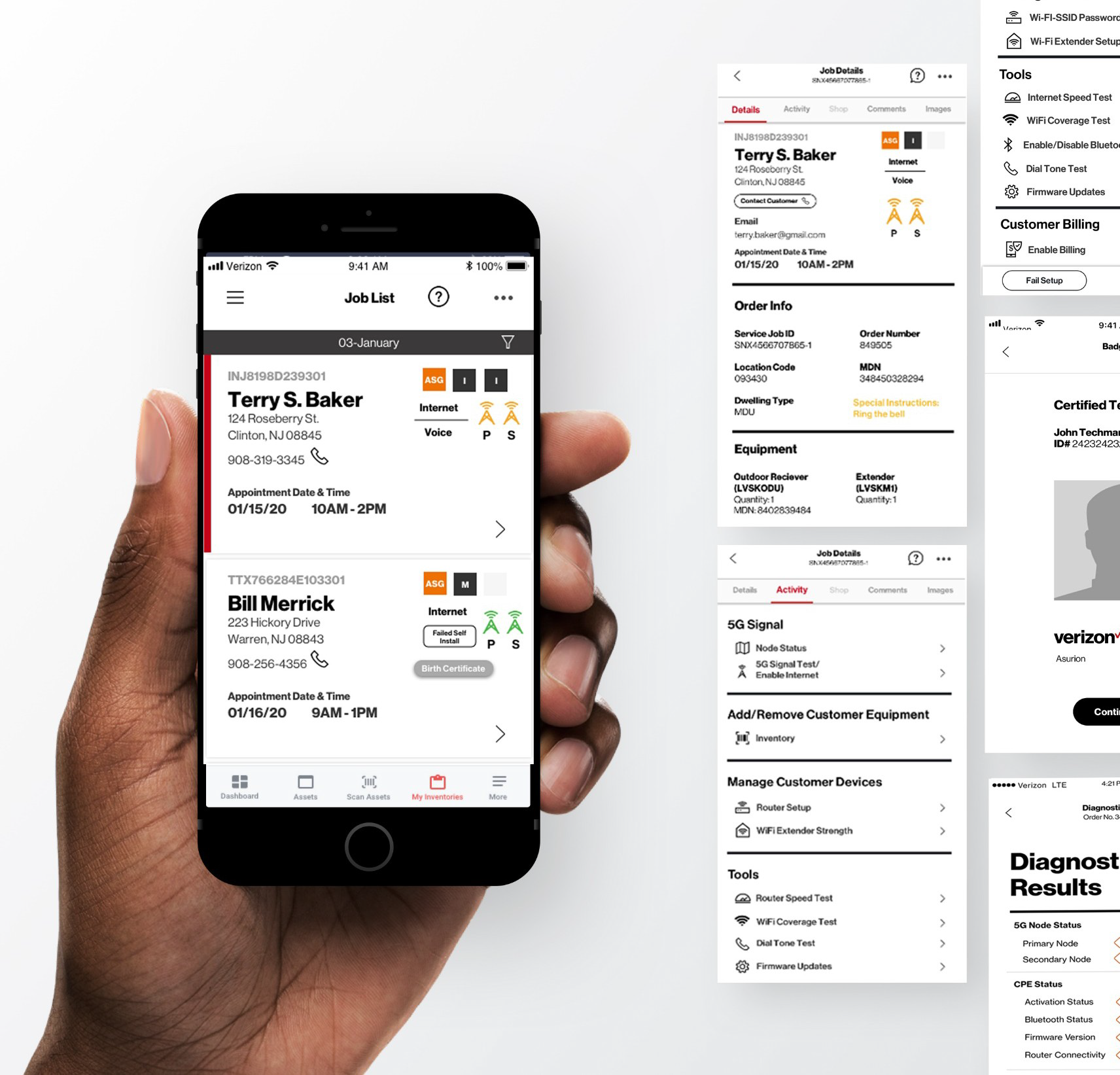
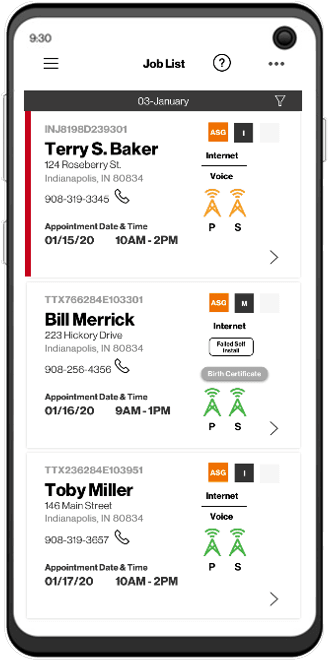
  • Designed installer flows and key screens (job list, job status, guided steps, confirmations).
  • Partnered with research and stakeholders to validate pain points and edge cases.
  • Supported developer handoff and iteration through build.

Problem Statement

The installation experience for Verizon’s Self-to-Pro program was fragmented across the customer, service teams, and field installers, with each group relying on different tools and partial information. This disconnect caused misaligned status updates, unclear customer expectations, and missing installer context, leading to delays, repeated support calls, and avoidable repeat visits.

Goals

  • Reduce install delays by aligning handoffs and job statuses.
  • Improve customer confidence with clearer readiness + progress visibility.
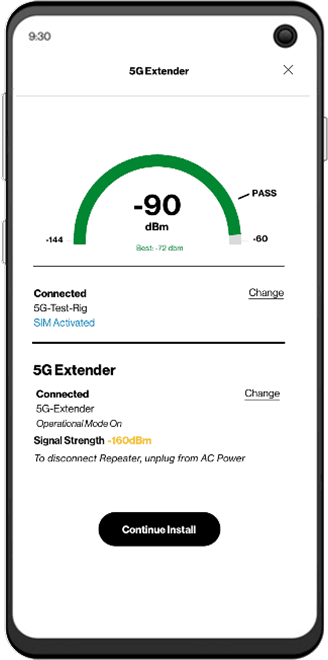
  • Support installers with guided on-site steps and validation tools.
  • Reduce repeat visits by helping teams catch issues earlier.

Previous Efforts

Before this work, installation tasks and updates were split across multiple systems. Support teams lacked a reliable view of field progress, customers had inconsistent updates, and installers re-entered the same information in more than one place. We needed a single workflow that defined what “done” looks like at each status.

Explorations

We explored how installation actually works across environments and roles, then translated that into early concepts for job status, guided steps, and on-site validation.

Site Visit 1
Technician Interview
Garage Environment
Hardware Scan

What we learned

Success depends on multiple handoffs: accurate scheduling and expectations, installer readiness, and a clean verification path to confirm signal and setup.

Key frictions

  • Status drift between teams.
  • Missing context at the doorstep.
  • Poor connectivity in garages and basements.
  • Duplicate data entry across systems.

Design direction

Build a guided installer flow that also improves visibility for service teams and customers through consistent statuses and clearer checkpoints.

Sketch + Test

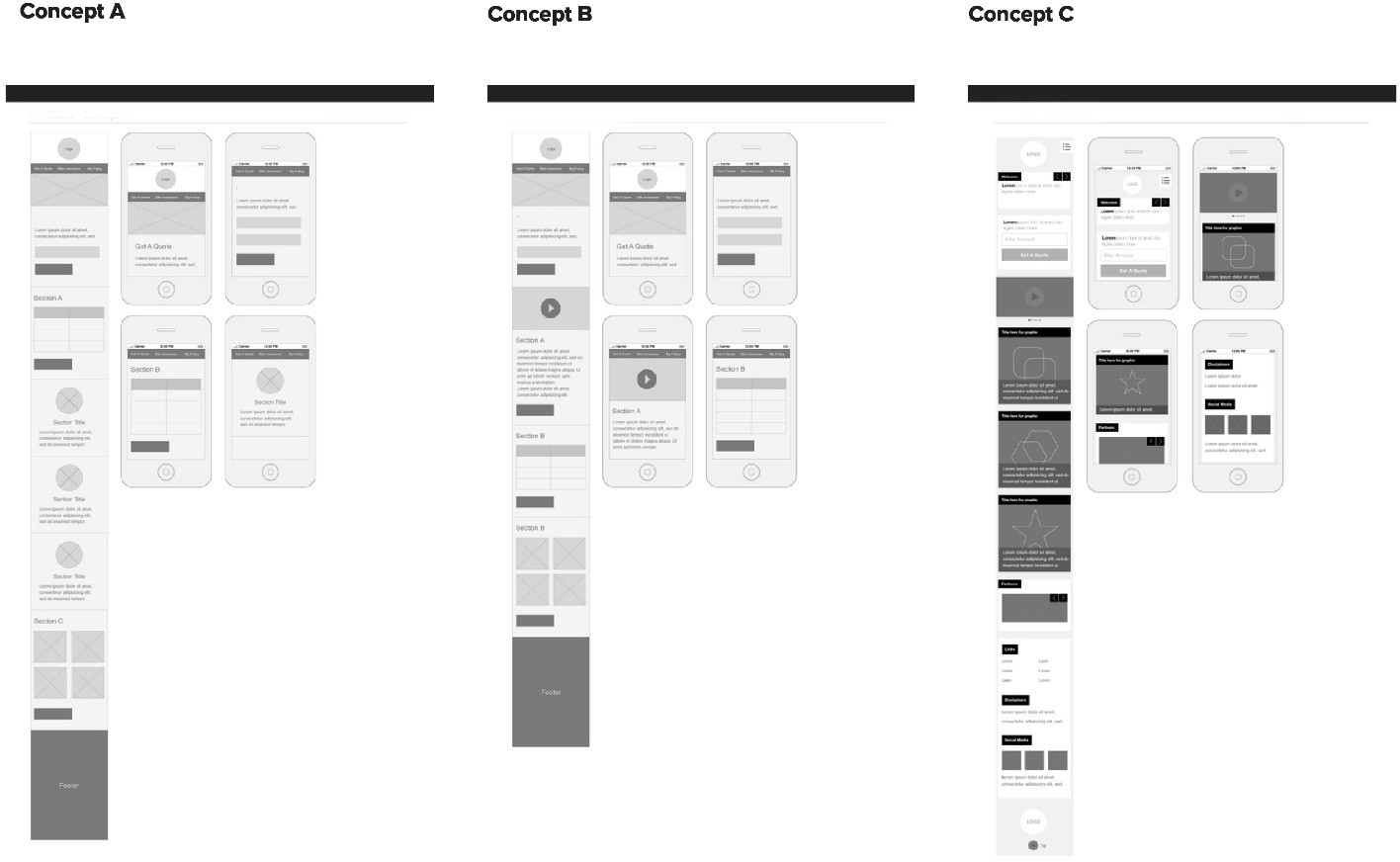
We tested early flows with installers, prioritized issues by severity, and iterated toward a guided experience that reduced confusion during high-pressure on-site moments.

Sketches and prototype iterations

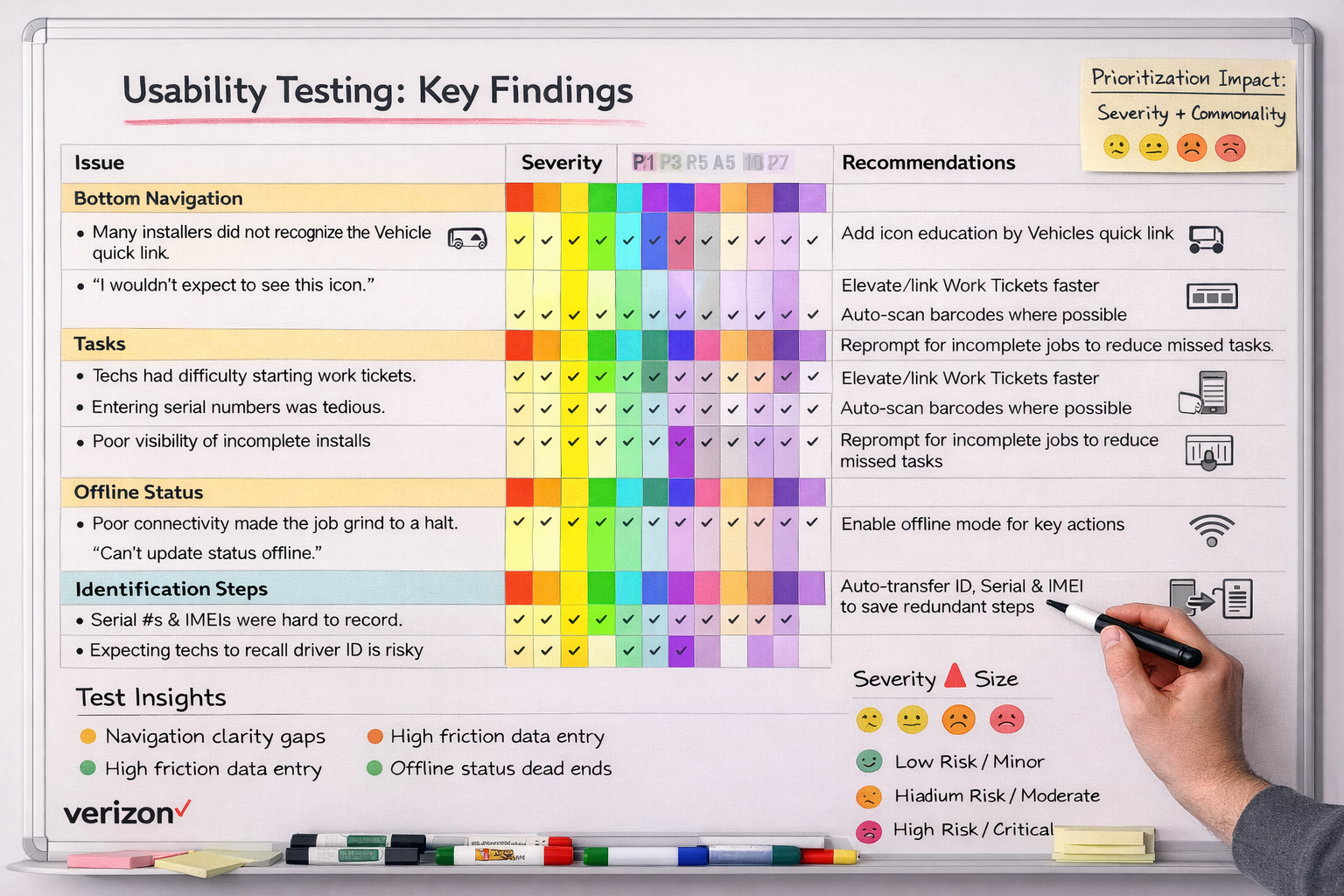
Usability testing: issue mapping

We tested the existing flow with technicians and mapped severity + frequency of issues to prioritize fixes.

7/7
Navigation clarity

Technicians struggled to distinguish key areas at a glance.

6/7
Action labeling

Primary actions were easy to confuse under time pressure.

Issue severity mapping
Early concept exploring a single guided step flow

Keep steps in one place

Installers needed a single guided path that reduces jumping between screens and systems.

Exploration of clear job status and progress visibility

Make status unambiguous

Clear status definitions decreased back-and-forth with support and reduced customer uncertainty.

Prototype concept for validation checkpoints during install

Validate what matters

We emphasized signal confirmation, inventory checks, and post-setup validation to prevent repeat visits.

Design & Iteration

Focusing on the VZ Check App—the primary tool for technicians in the field.

Usability Testing: The "Rainbow Sheet"

We tested the existing app with 7 technicians. The results were visually mapped using a rainbow sheet to highlight severity and frequency of errors.

7/7
Confusing Icons

Users couldn't distinguish between "Service" and "Install" icons.

6/7
Search CTA Failure

Users confused "Search" with "Submit".

Rainbow Sheet Analysis
>

Finalize Job Logic

  • Added "Customer Unavailable" checkbox (common edge case).
  • Added clear hint text "Tap box to sign" for signatures.
  • Required "Notes" field if job status is incomplete.

Navigation & Clarity

  • Replaced ambiguous icons with text labels.
  • Moved "Ad Hoc QA" to a secondary menu to reduce clutter.
  • Added "Install Date" directly to the Work Ticket list card.

QA Diagnostics

  • Changed status verbiage from "Acceptable" to "Good/Bad".
  • Used bold, colored text for status (Red/Green) for scanning.
  • Added tooltips for image uploads.

Finalize + Deliver

Add your handoff details here (specs, redlines, states, QA notes, and collaboration details).

UX Prototype

Installer Field Service App (Self-to-Pro Workflow)

This prototype demonstrates an end-to-end mobile field service experience for telecom installers, designed from a service blueprint to support real-world job execution from arrival to closeout. The goal is to reduce missed steps, improve consistency, and make complex install work feel guided and trackable.

Service Blueprint Map

The Results

Our research highlighted the critical need to streamline the process. The immediate impact was shifting leadership's perspective.

Funded

Official Cross-functional Team Established

Unified

Consolidated 3 Legacy Systems

Improved

CSAT & First-Time Install Success

Interested in seeing the full high-fidelity prototypes?

Get in Touch